Demos · Demo
Demo: one visit from recording to note to claim draft
 By Javier Alvarez · Updated · 4 min read
| Visit | 37-minute initial MNT visit, fictional patient, scripted and read by text-to-speech |
|---|---|
| Duo Practice | Chart and claim draft ready to review in 1:56 |
| Practice Better (AI summary) | Chart pasted in and claim filled in 6:35 |
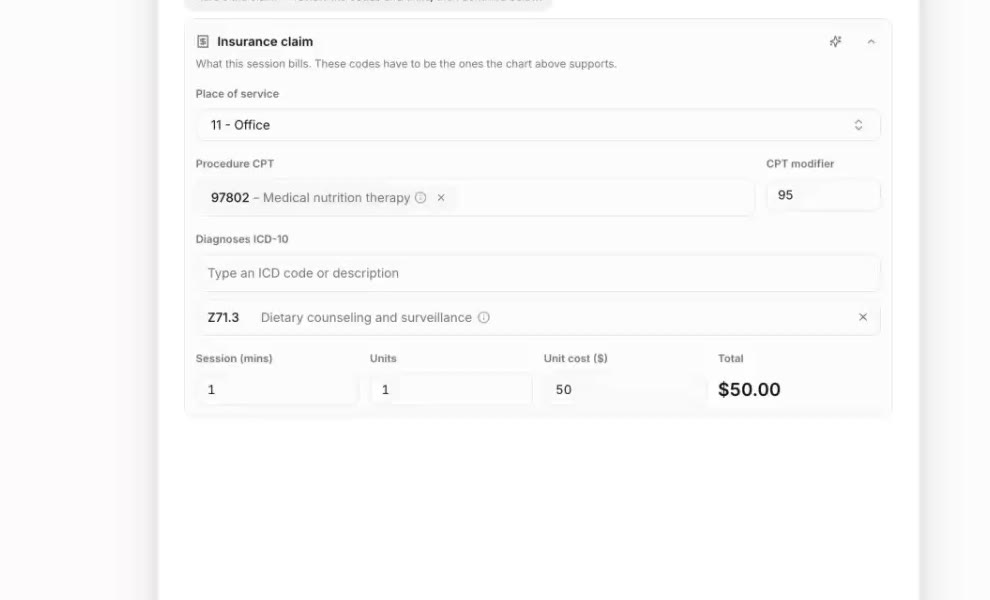
| Claim draft | 97802, 3 units as drafted (the audio runs 37:42, see the note below), modifier 95, telehealth (home), Z71.3, R73.03, E66.9 |
| Video | 48 seconds, 8x then 16x time-lapse, real-time timers, no sound |
Disclosure: we make Duo Practice, and we recorded this video. It shows one visit, so read it as a demo and not a benchmark. The patient and the visit are fictional.
The steps, from recording to claim draft
Both tools go through the same five steps, and the timer runs until the chart and the claim are done.
- Calendar. Open the visit on the calendar.
- Session. Open the session with the visit's recorded audio, a 37-minute initial assessment.
- Transcript. The audio becomes a transcript with each line credited to the dietitian or the patient.
- Chart. In Duo, the AI fills the ADIME chart from the transcript: visit type, conditions, chief motivation, height, weight and BMI, history, the PES diagnosis, goals and monitoring. You edit and sign it.
- Claim. Duo drafts the claim from the chart: 97802 because it is the first visit, the units from the session length, modifier 95, telehealth place of service with the patient at home, and the diagnoses Z71.3, R73.03 and E66.9. The claim waits for your review; after you approve, Duo files it through your own Claim.MD account.
In Practice Better, step 4 is its AI summary, which you paste into the chart, and step 5 is its claim form, which you fill in.
What to check here before you approve. The audio in this demo runs 37 minutes 42 seconds, and the draft shows the session as 38 minutes and 3 units. Under the CMS midpoint rule for 15-minute codes, 23 to 37 minutes is 2 units and 38 to 52 is 3 (CMS Ch. 5 §20.2). Whether this visit is 2 or 3 units depends on the documented start and end of the session, not on the length of the recording. That is the kind of line you confirm before the claim goes out.
Text transcript of the video
The video has no voice-over. These are the captions and the key numbers on screen, in order. Times are the timers in the video, which run in real time while the picture is sped up.
- Title: "Same visit. Same patient. Watch the clock." Duo Practice on the left, Practice Better on the right. "8× speed · real time on the timers."
- 0:00. Both timers at 0:00. Both at Step 1 of 5, Calendar.
- By 0:12. Duo at Step 3 of 5, Transcript. Practice Better at Step 1 of 5, Calendar.
- By 0:28. Practice Better at Step 2 of 5, Session.
- By 0:44. Practice Better at Step 3 of 5, Transcript. Its recording is still processing.
- By 1:16. Duo at Step 4 of 5, Chart. The claim draft is open next to the chart, with the session length 37:42 at the top: "Initial assessment · 97802 · 3 units · Aetna · rate not set." Session 38 minutes, 3 units. Modifier 95. Place of service: Telehealth (Home). Diagnoses ICD-10: Z71.3, R73.03, E66.9. Buttons: "Save draft" and "Continue and save draft."
- 1:56.7. Duo: "All 5 steps · Calendar · Session · Transcript · Chart · Claim." Badge: "Chart + claim ready." The header changes to "8×, then 16× for Practice Better."
- 2:11 to 4:19. Practice Better, at 16×, still on Step 3 of 5, Transcript, "still running." Under Duo, the lead grows: "+0:15 ahead," then "+1:19," then "+2:23."
- By 4:51. Practice Better at Step 4 of 5, Chart.
- By 5:55. Practice Better at Step 5 of 5, Claim, with its claim form open.
- 6:35.6. Practice Better: "All 5 steps · Calendar · Session · Transcript · Chart · Claim." "Chart pasted in · claim filled." Under Duo: "+4:39 faster."
- The output. "Same visit, real screens." Left: "Duo Practice · AI chart (ADIME) + claim draft." Right: "Practice Better · AI summary." Caption: "Duo: a structured ADIME chart (assessment, PES diagnosis, goals, monitoring) and a claim draft. Practice Better: a narrative summary."
- End card. "Duo Practice. 1:56. Visit → chart + claim. 3.4× faster vs. Practice Better 6:35. Transcript 99.9% accurate · speaker per line 99.7% (Practice Better 99.6% · 95.1%). Same 37-min audio, same visit. Practice Better: AI summary only. 8× then 16× time-lapse, real-time timers, no cuts. duopractice.com."
The accuracy figures on the end card are our own measurement on this one fictional visit.
What the demo shows, and what it doesn't
It shows the part that takes the most time after a visit: getting from a recording to a chart and a claim draft that is ready to review. It doesn't show the approval and filing step, or what comes after: Duo reads the claim's status and the ERA from your Claim.MD account and matches the payment.
It is one visit, run by us, on our own accounts. Practice Better has strengths this video doesn't touch, such as programs, packages and a client portal; Practice Better vs Duo Practice compares them fairly. For what Duo Practice is and what it costs, see the AI scribe that files the claim.
Duo Practice is the AI scribe that files the claim: chart and claim draft from one recording, filed through your own Claim.MD account once you approve. Try Duo Practice free